
7shifts Integration for Thrive POS
Stop building next week's schedule off last week's guess
Most schedules get built from memory. The manager remembers last Friday felt busy, so they add a driver. Nobody checks whether the labor actually matched the sales, because pulling that comparison means exporting from the POS and lining it up by hand. By the time you see the labor percentage, the week is over and you cannot do anything about it.
What it does
- Sends your Thrive POS sales history to 7shifts so schedules get built against what each daypart actually did
- Sends clock-ins, clock-outs, and breaks over automatically, so hours worked come from the POS instead of a manager's notes
- Keeps employees, departments, and roles in sync, so a new hire added in Thrive POS shows up ready to schedule
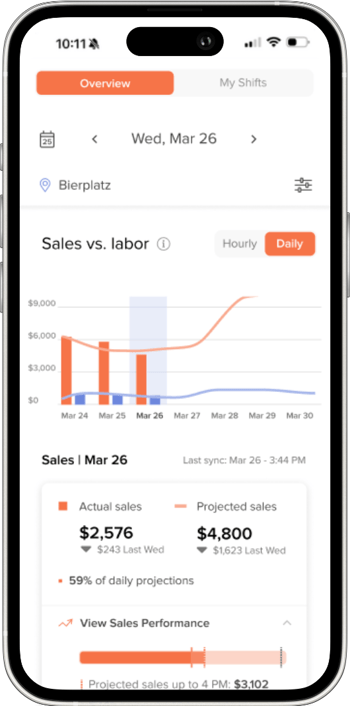
- Gives you labor against sales while the week is still running, not after it closes
What syncs
- Sales What each daypart actually did, so the schedule gets built against real demand instead of a hunch.
- Time punches Clock-ins, clock-outs, and breaks, so hours worked come from the POS rather than a manager's notes.
- People Employees, departments, and roles, so a new hire is ready to schedule without being entered twice.
Data moves in one direction, out of Thrive POS. Schedules are built and published in 7shifts, where your managers already work.
Setup, support, and cost
One number to call
Thrive POS handles setup and configuration. If something stops syncing, you call us first. You are not chasing two vendors to find out whose problem it is.
How it is billed
Your 7shifts subscription is billed by 7shifts. We will walk you through what the Thrive POS side involves.
Common questions
Is 7shifts included with Thrive POS?
No. 7shifts is a separate subscription billed by 7shifts. The connection between the two systems is set up and supported by Thrive POS.
Do I have to enter employees in both systems?
No. Employees, departments, and roles added in Thrive POS sync over to 7shifts, so a new hire is ready to schedule without being typed in twice.
Does 7shifts push schedules back into Thrive POS?
Data flows from Thrive POS into 7shifts. Schedules are built and published in 7shifts, where your managers work.
Where do time punches get edited?
In Thrive POS. Keeping edits in one place means one record of every shift instead of two versions that disagree.
Who do I call if data stops flowing?
Thrive POS support. We will look at it first and take it to 7shifts if the issue turns out to be on their side.
What else does Thrive POS integrate with?
Inventory, back office, gift cards, delivery channels, and cellular backup. See the full list on our integrations page.
See it running in a real pizza shop
Watch a demo and we will show you how sales and labor data moves between the two systems.
Watch a DemoAlready on Thrive POS? Contact support to get 7shifts connected.